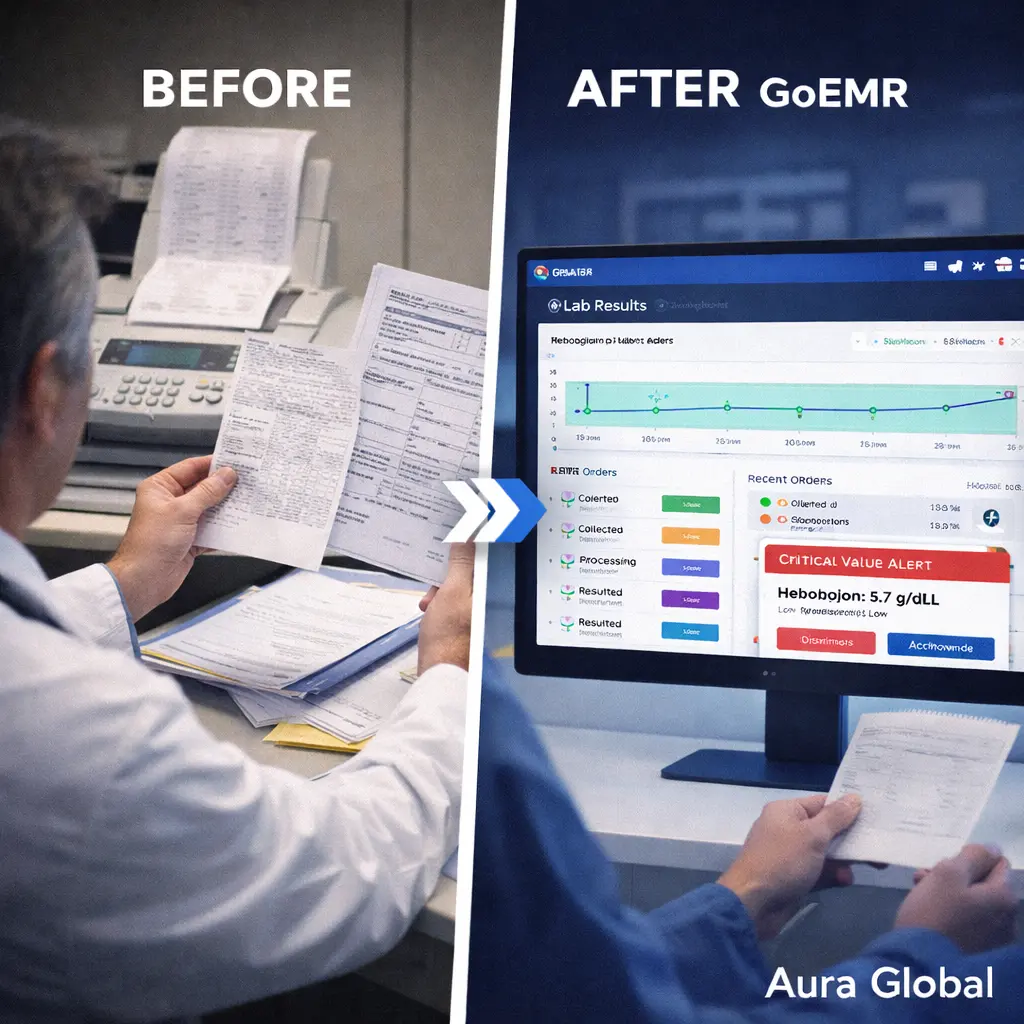
"The lab results? Let me check… they might be in the fax machine." If that sentence sounds familiar, your practice has a lab workflow problem. And you're not alone. In thousands of clinics and hospitals across the country, lab results arrive by fax, get printed on thermal paper, sit in a tray until someone picks them up, and eventually — maybe — make it into the patient's chart. Sometimes they don't. Sometimes the fax is illegible. Sometimes the results arrive on Friday evening and nobody sees them until Monday morning. And sometimes, a critical value sits unread for hours because it was buried in a stack of routine results.
The lab workflow in most practices is a chain of handoffs, and every handoff is a point of failure. The provider orders a test verbally or on paper. Someone transcribes the order into the lab system. The specimen is collected, labeled, and sent. The lab processes it and sends results back — by fax, by interface, by carrier pigeon, depending on the vintage of the systems involved. The results arrive somewhere. Someone is supposed to review them. Someone is supposed to notify the patient. And someone is supposed to document the follow-up plan. Every "someone" is a potential gap.
AuraEMR's Lab module was built to close every one of those gaps. Order tests with two clicks from the encounter note. Track specimen status in real time. Receive results directly into the patient chart — structured, coded, and ready for clinical action. Trend values over time with interactive charts. And when a critical value comes back, get an instant alert that doesn't wait for the fax machine. LOINC-coded. LIS-integrated. Life-saving.
Lost in the Fax Machine
The fax machine has no business being a critical node in a healthcare workflow. And yet, in 2026, it remains the primary method of lab result delivery for a staggering number of practices. The reasons are historical — fax was the first electronic transmission method that worked across different systems, and healthcare infrastructure moves slowly. But the consequences are current and ongoing.
Here's what a fax-based lab workflow actually looks like in practice:
- Results arrive as images, not data — A faxed lab result is a picture of text. It can't be searched, trended, or automatically compared to previous values. Every number on that fax has to be read by a human and manually entered into the chart if it's going to be part of the patient's longitudinal record. Most of the time, the fax itself gets scanned as a PDF and filed — but the actual values never make it into structured fields.
- Delivery is unreliable — Fax machines run out of paper. They run out of toner. They get busy signals. They print illegibly. A result that the lab sent at 2:00 PM might not print until someone clears the paper jam at 4:30 PM. And there's no delivery confirmation that anyone actually looked at it — only that the machine received the transmission.
- Routing is manual — When a fax arrives, someone at the practice has to read the header, identify the ordering provider, and route the result to the right person. In a multi-provider practice, this means a staff member sorting through a stack of faxes multiple times a day, putting each one in the right inbox or scanning it into the right patient's chart. It's a full-time job in some practices — a full-time job that adds zero clinical value.
- Critical values get buried — A critical hemoglobin of 5.2 arrives on the same fax machine as a routine lipid panel. Both sit in the same tray. Both wait for the same sorting process. The lab may call the office to report the critical value verbally, but if the provider is with a patient and the message gets taken by someone who doesn't understand the urgency, the response is delayed. In lab medicine, "delayed" can mean "too late."
- No audit trail — Who received the result? When was it reviewed? Was the patient notified? What was the follow-up plan? In a fax-based workflow, the answers to these questions live in handwritten notes, phone logs, and memory. In a malpractice case, "I think the nurse told the patient" is not a defensible answer.
A lab result that arrives but isn't seen, isn't acted on, or can't be found later might as well not have been ordered. The fax machine is where clinical data goes to disappear.
Two-Click Lab Ordering
Ordering a lab test should be as fast as the clinical decision to order it. In most EMR systems, it's not. The provider decides the patient needs a CBC and a metabolic panel, then navigates through menus, searches for order codes, selects the performing lab, fills in clinical indications, and confirms the order. What should take five seconds takes two minutes. Multiply that across 20 patients a day, and the provider has lost 40 minutes to order entry — time that could have been spent with patients.
AuraEMR strips lab ordering down to its essentials:
- Context-aware order entry — Lab orders are placed directly from the encounter note, with the patient's diagnoses and current medications already loaded. The system knows the clinical context. When you order a hemoglobin A1c, AuraEMR already has the diabetes diagnosis linked. When you order a PT/INR, the warfarin prescription is right there. No redundant data entry. No toggling between screens to find the indication code.
- Quick-order panels — Common lab combinations are saved as order panels. "Annual wellness labs" might include CBC, CMP, lipid panel, TSH, and A1c — all orderable with a single click. Providers can customize their own panels based on their practice patterns. A cardiologist's go-to panel is different from a primary care physician's, and AuraEMR accommodates both without forcing everyone into the same template.
- Standing orders and recurring labs — For patients on chronic medications that require monitoring — methotrexate, lithium, warfarin, biologics — AuraEMR supports standing orders that automatically generate lab requisitions at specified intervals. The patient gets a reminder, the lab gets the order, and the provider gets the result — without anyone having to remember to re-order the same test every month.
- Diagnosis-linked ordering — Every lab order is automatically linked to the appropriate ICD-10 diagnosis code from the encounter. This isn't just clinical documentation — it's billing protection. A lab test without a supporting diagnosis code gets denied. AuraEMR ensures the link is made at the point of ordering, not retroactively by a billing specialist trying to figure out why the test was ordered.
- Electronic transmission to the lab — Orders are sent electronically to the performing laboratory through standard HL7 interfaces. No paper requisitions. No faxed order forms. No handwriting to misread. The order arrives at the lab with the patient's demographics, insurance information, ordering provider, clinical indication, and specimen requirements — everything the lab needs to process the test without a callback.
Two clicks: select the test, confirm the order. The clinical decision is the hard part. The order entry shouldn't be.
Real-Time Specimen Tracking
Between the moment a lab test is ordered and the moment a result is returned, the specimen goes on a journey. It's collected from the patient, labeled, stored, transported to the lab, accessioned, processed, analyzed, and reported. In most practices, that entire journey is invisible. The provider orders the test and then waits — with no idea whether the specimen was collected, whether it arrived at the lab, whether the lab is processing it, or whether there was a problem along the way.
This invisibility creates real clinical problems:
- Uncollected specimens — The provider orders a fasting glucose, but the patient leaves without having blood drawn. Nobody notices until the results don't come back — which might be days later, or might be never if nobody is tracking pending orders. The test effectively didn't happen, and the clinical decision that depended on it gets deferred.
- Specimen issues — The lab receives the specimen but it's hemolyzed, insufficient quantity, or improperly labeled. The lab rejects it and sends a notification — by fax, naturally — that may or may not reach the ordering provider in time to recollect before the patient leaves.
- Processing delays — Some tests take days. A culture and sensitivity might take 72 hours. A send-out to a reference lab might take a week. Without visibility into processing status, the provider calls the lab to ask "Is it back yet?" — a time-consuming inquiry that the lab's phone system makes as painful as possible.
AuraEMR provides real-time visibility into every stage of the specimen lifecycle:
- Order status tracking — Every lab order in AuraEMR carries a status that updates in real time: ordered, collected, received by lab, processing, resulted, or cancelled. The provider and clinical staff can see where every pending order stands without making a single phone call.
- Collection confirmation — When the specimen is collected — whether in-house or at an external lab — the status updates to "collected" with a timestamp. If a specimen hasn't been collected within the expected timeframe, AuraEMR flags it. An order that was placed three days ago and never collected is a clinical gap that needs attention.
- Rejection alerts — If the lab rejects a specimen, the alert comes back into AuraEMR immediately — not as a fax that might be seen tomorrow. The rejection reason is displayed (hemolyzed, QNS, mislabeled), and the system prompts for a recollection order. The turnaround from rejection to recollection drops from days to minutes.
- Pending order dashboards — A practice-wide view shows every pending lab order across all patients, sorted by age. Orders that have been pending for longer than expected are highlighted. A provider can see at a glance that they have 12 results outstanding, 3 of which have been pending for more than 5 days. No more wondering. No more calling the lab.
- Patient communication — When results are available, AuraEMR can automatically notify the patient through the patient portal with a message that their results are ready for review. For normal results that the provider has pre-approved for automatic release, the patient sees their results the same day. For abnormal results that require provider review, the patient is notified that results are in and the provider will be in touch.
A lab order you can't track is a lab order you can't trust. Visibility from order to result isn't a luxury — it's a safety requirement.
Results Directly into the Chart
The value of a lab result is directly proportional to how quickly and accurately it reaches the provider who ordered it and becomes part of the patient's permanent record. A result that arrives as a fax, gets scanned as an image, and filed as an unstructured PDF is technically "in the chart" — but it's clinically useless for comparison, trending, or decision support. It's a picture of data, not actual data.
AuraEMR receives lab results as structured, coded data through standard electronic interfaces:
- LOINC-coded results — Every result that flows into AuraEMR is mapped to LOINC (Logical Observation Identifiers Names and Codes) — the universal standard for laboratory and clinical observations. A hemoglobin result is stored as LOINC code 718-7, not as free text that might say "Hgb," "Hemoglobin," "HGB," or "Haemoglobin" depending on which lab processed it. Standardized coding means standardized trending, standardized alerts, and standardized reporting — regardless of which lab performed the test.
- Automatic chart filing — Results are automatically filed into the correct patient's chart, linked to the original order, and associated with the encounter that generated the order. No manual filing. No misfiles. No results sitting in a queue waiting for someone to figure out which patient they belong to.
- Normal range flagging — Every result is displayed with the reference range from the performing lab. Values outside the normal range are flagged — high values in one color, low values in another, critical values with prominent alerts. The provider doesn't have to memorize reference ranges or scan a dense table of numbers to find the abnormality. It's highlighted.
- Provider review workflow — New results appear in the provider's inbox, organized by patient and urgency. The provider reviews each result, adds a comment or follow-up plan if needed, and marks it as reviewed. This creates an auditable record of when the result was seen, by whom, and what action was taken — the documentation trail that every malpractice attorney will look for and every compliance auditor will require.
- Patient notification — Once the provider reviews a result and marks it for release, AuraEMR sends the result to the patient through the patient portal with the provider's comments. "Your cholesterol is 242. We discussed starting a statin at your next visit. Please schedule a follow-up in 3 months." The patient gets the result, the context, and the plan — not a raw number with no explanation.
Lab results are clinical decisions waiting to happen. When they arrive as structured data, filed in the right chart, flagged for abnormalities, and routed to the right provider — those decisions happen faster, more accurately, and with a complete audit trail.
Critical Value Alerts That Don't Wait
A critical lab value is a result so far outside the normal range that it represents an immediate threat to the patient's life. A potassium of 6.8. A hemoglobin of 4.1. A troponin that's ten times the upper limit. A blood glucose of 40. These results demand immediate clinical action — not in an hour, not when the provider finishes their current patient, not when someone checks the fax machine. Now.
The laboratory is required by regulation to notify the ordering provider of critical values within a defined timeframe — typically 30 minutes. In practice, this notification usually happens by phone. The lab calls the office. The call goes to the front desk. The front desk takes a message. The message gets passed to a nurse. The nurse tries to find the provider. The provider is in a room with a patient. The message waits.
AuraEMR eliminates every link in that broken chain:
- Instant in-system alerts — When a critical value is received through the electronic interface, AuraEMR generates an immediate alert that appears on the provider's screen regardless of what they're doing in the system. It's not a notification that can be ignored in an inbox. It's a prominent, can't-miss alert that identifies the patient, the test, the value, and the critical threshold it exceeded.
- Multi-channel notification — Beyond the in-system alert, AuraEMR can send critical value notifications via secure text message, push notification to the AuraEMR mobile app, or escalation to a covering provider if the ordering provider doesn't acknowledge within a configurable timeframe. The alert doesn't stop until someone acknowledges it.
- Escalation protocols — If the ordering provider doesn't acknowledge a critical value alert within 15 minutes (configurable), AuraEMR escalates to the covering provider or the department supervisor. If nobody acknowledges within 30 minutes, it escalates further. Critical values don't sit unread because the provider is in surgery, on vacation, or off-site. The system ensures someone sees it.
- Acknowledgment with required action — Acknowledging a critical value in AuraEMR isn't just clicking "OK." The provider must document the action taken: "Patient called and advised to go to ED," "Dose adjusted and recheck ordered," "Patient already inpatient, care team notified." This documentation creates the audit trail that proves the critical value was received, reviewed, and acted upon — the three elements that every regulatory body and every plaintiff's attorney will examine.
- Critical value log — AuraEMR maintains a centralized log of every critical value received, the time it was received, the time it was acknowledged, by whom, and what action was taken. This log is available for quality assurance review, CLIA compliance, and accreditation surveys. No manual tracking spreadsheet required.
A critical value that isn't seen in time is a critical value that failed the patient. The alert system shouldn't depend on fax machines, phone tags, or sticky notes. It should be instant, persistent, and documented.
Trend Charts That Tell the Story
A single lab result is a snapshot. A series of lab results over time is a story. And that story — whether a patient's kidney function is stable or declining, whether their diabetes is controlled or worsening, whether their anemia is responding to treatment or getting worse — is often more clinically important than any individual number.
In most EMR systems, viewing lab trends means scrolling through a table of dates and numbers, or opening each result individually and mentally plotting the values. It's tedious, error-prone, and nearly impossible when you're trying to see the pattern across twenty results spanning two years.
AuraEMR makes trending automatic and visual:
- Interactive trend charts — Select any lab test and AuraEMR generates an interactive line chart showing every result over time. Hemoglobin A1c over two years. Creatinine over six months. Liver enzymes over the course of a medication trial. The chart is zoomable, scrollable, and displays exact values on hover. The story jumps off the screen.
- Normal range shading — The trend chart includes shaded bands for the normal reference range. Values within range are visually distinct from values outside range. A creatinine that's been creeping from 1.1 to 1.4 to 1.8 over twelve months shows a clear upward trajectory against the normal range ceiling — a pattern that's easy to miss in a table of numbers but impossible to miss on a chart.
- Multi-test overlay — Plot multiple related tests on the same chart. Display hemoglobin and ferritin together to see if iron supplementation is working. Show BUN and creatinine together to assess kidney function. Overlay AST and ALT with the start date of a new medication to see if it's causing hepatotoxicity. Correlation that would require comparing two separate tables becomes visually obvious.
- Clinical event markers — AuraEMR can overlay clinical events on the trend chart: medication changes, hospitalizations, procedures, and diagnosis dates. A spike in creatinine that coincides with the start of an NSAID tells a different story than a spike with no clear trigger. Context transforms data into insight.
- Exportable and shareable — Trend charts can be exported as images for inclusion in referral letters, printed for the patient to take home, or shared through the patient portal. A patient who can see their A1c trending downward over six months has visual proof that their lifestyle changes are working. That's motivating in a way that a number on a printout never is.
Lab data without trends is trivia. Lab data with trends is clinical intelligence. AuraEMR transforms every result from an isolated number into a chapter in the patient's ongoing clinical narrative — visible at a glance, actionable in real time, and documented for every provider who needs to see it.
Never again will the answer to "Where are the lab results?" be "Check the fax machine."
LOINC-coded. LIS-integrated. Life-saving.
AuraEMR's Lab module lets you order tests with two clicks, track specimens in real time, receive results directly into the chart, trend values over time, and get instant critical value alerts — because lab results are too important to leave to the fax machine.