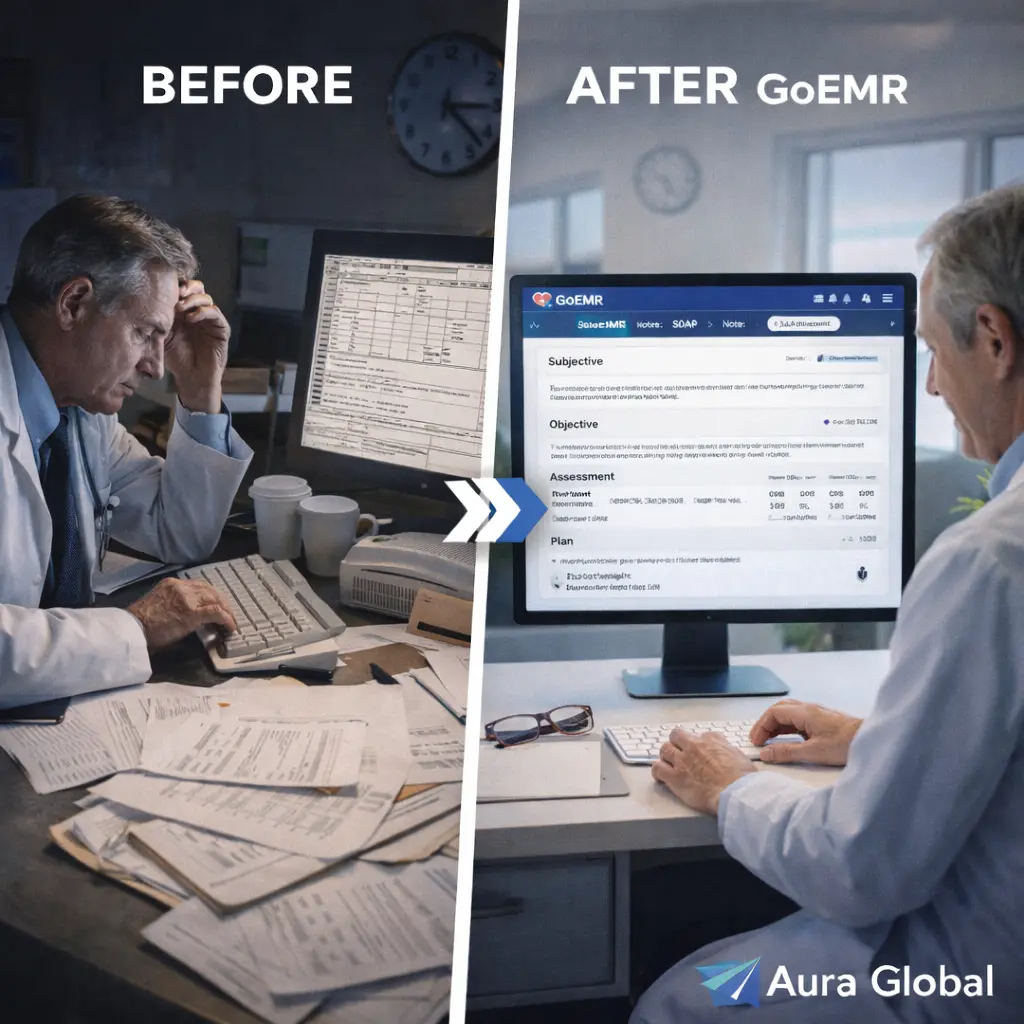
The average doctor spends 2 hours on documentation for every 1 hour spent with patients. Two hours. For every sixty minutes of doing the work they trained for — examining, diagnosing, treating, counseling — they spend a hundred and twenty minutes typing, clicking, scrolling, and fighting with an EMR that was designed for billing compliance, not clinical care.
This isn't a minor inconvenience. It's the single largest driver of physician burnout in modern healthcare. Studies from the American Medical Association, the Mayo Clinic, and the Annals of Internal Medicine all converge on the same conclusion: documentation burden is destroying the profession. Physicians who entered medicine to help people are spending their evenings doing data entry. They call it "pajama time" — the hours after the kids are in bed when they finally open the EMR and finish the notes from the day. It's not sustainable. It's not acceptable. And it doesn't have to be this way.
AuraEMR was built to flip the ratio. Smart SOAP note templates that adapt to the visit type. Specialty-specific macros that turn three clicks into three paragraphs. Voice-to-text dictation that lets providers talk instead of type. Auto-populated vitals and lab values that eliminate redundant data entry. And one-click assessment and plan builders that generate structured, compliant documentation from clinical decisions — not the other way around. Document faster. Document better. Get back to why you became a doctor.
The Documentation Burden
The documentation problem in healthcare isn't that doctors don't want to document. It's that the tools they've been given make documentation unnecessarily slow, repetitive, and disconnected from the clinical workflow. The EMR was supposed to make charting easier. For most physicians, it made it worse.
Here's what encounter documentation looks like in a typical practice:
- The template problem — Most EMRs ship with generic templates that don't match how any specific specialty thinks or works. A family medicine physician documenting a well-child visit uses the same basic structure as an orthopedic surgeon documenting a post-operative follow-up. The templates are either too generic to be useful or so heavily customized by the IT department that they're rigid and fragile. Providers end up free-typing most of their notes because the template doesn't fit.
- The click problem — Legacy EMRs are built on the premise that structured data requires structured input — which means checkboxes, dropdowns, and radio buttons. Lots of them. A complete review of systems might require 14 clicks. A physical exam section might require 30. Each click takes a second or two, and the cognitive overhead of navigating nested menus and remembering which tab holds which section slows the provider down far more than the raw click count suggests.
- The redundancy problem — The patient's vitals were entered by the nurse during intake. Their current medications are in the medication list. Their allergies are in the allergy section. Their latest lab results are in the lab module. And yet, when the provider writes the encounter note, much of this information has to be manually referenced or re-entered into the note for it to be complete. The data exists in the system. It just doesn't flow into the note.
- The after-hours problem — A provider who sees 25 patients in a day doesn't have time to complete 25 detailed notes between appointments. The notes pile up. By 5:00 PM, there are a dozen unfinished charts. The provider goes home, eats dinner, and logs in to finish. This is where clinical quality degrades — notes written from memory hours after the encounter are less accurate, less detailed, and less useful than notes written in real time. But the EMR is too slow to allow real-time documentation during a 15-minute visit.
- The burnout connection — The Medscape National Physician Burnout Report consistently identifies "too many bureaucratic tasks" and "spending too many hours at work" as the top two drivers of burnout. Documentation is both. It's bureaucratic because much of it serves billing and compliance rather than clinical care. And it extends the workday by hours because the tools are too slow. Physicians who burn out leave the profession. The ones who stay become less engaged, less empathetic, and less effective. Documentation burden isn't just an efficiency problem — it's a patient care problem.
Nobody went to medical school to become a data entry clerk. If the EMR makes documentation the hardest part of the day, the EMR is the problem.
Smart SOAP Note Templates
The SOAP format — Subjective, Objective, Assessment, Plan — has been the standard for clinical documentation for over fifty years because it works. It organizes clinical thinking into a logical flow: what the patient reports, what the provider observes, what the provider concludes, and what happens next. The problem isn't the format. It's that most EMRs implement SOAP notes as blank text boxes with labels, offering no assistance in actually populating them.
AuraEMR's SOAP note templates are smart — they adapt to the context and do the heavy lifting:
- Visit-type driven templates — A new patient visit, an acute sick visit, a chronic disease follow-up, a well-child check, a pre-operative clearance, and a post-surgical follow-up are all fundamentally different encounters. AuraEMR loads the appropriate template based on the appointment type. The well-child template includes age-appropriate anticipatory guidance prompts, growth chart integration, and immunization review. The chronic disease follow-up includes the relevant metrics for that condition (A1c for diabetes, blood pressure for hypertension, PHQ-9 for depression). The template frames the note around what matters for this visit.
- Chief complaint driven content — When the provider enters the chief complaint — "cough x 3 days" or "knee pain after fall" — AuraEMR adjusts the template to include the most relevant review of systems questions, physical exam elements, and differential diagnosis options for that complaint. A respiratory complaint pulls in respiratory ROS questions and lung exam findings. A musculoskeletal complaint pulls in joint-specific exam templates and imaging order shortcuts. The note is pre-shaped around the clinical problem before the provider types a word.
- Customizable by provider — Every provider documents differently, and AuraEMR respects that. Templates can be customized at the individual provider level. A physician who prefers bullet points over paragraphs, or who always includes a specific section for patient education notes, can modify their templates without affecting anyone else's. The system adapts to the provider, not the other way around.
- Version-controlled and shareable — When a practice develops a documentation standard — "all diabetic visits should include this template" — it can be published as a shared template available to all providers. Templates are version-controlled, so updates are propagated across the practice without breaking existing notes. Best practices in documentation become institutional practices, not individual habits.
- Compliance-aware structure — AuraEMR's templates are structured to support appropriate E&M coding. The elements required for different levels of service — number of systems reviewed, complexity of medical decision-making, time spent — are built into the template flow. A provider who documents thoroughly using the template produces a note that naturally supports the correct billing level, without having to think about coding while caring for the patient.
A good template doesn't constrain the provider. It accelerates them. It handles the structure so the provider can focus on the content. AuraEMR's templates turn a blank page into a framework that's 60% complete before the provider starts typing.
Specialty-Specific Macros
In clinical documentation, the same phrases, findings, and plans come up again and again. A normal cardiac exam is documented the same way a hundred times a week. A standard diabetes management plan follows the same structure for every stable patient. A normal pediatric well-child exam has the same fifteen findings every time. Typing these repeatedly — or worse, clicking through checkboxes to reconstruct them from atomic elements — is where documentation time evaporates.
AuraEMR's macro system turns repetitive documentation into single actions:
- Text expansion macros — Type a short trigger phrase and AuraEMR expands it into a full clinical statement. ".norcardiac" becomes "Regular rate and rhythm. No murmurs, rubs, or gallops. No peripheral edema. Capillary refill less than 2 seconds bilaterally." ".norlung" becomes "Clear to auscultation bilaterally. No wheezes, rhonchi, or rales. Normal respiratory effort. No accessory muscle use." A complete physical exam section that would take two minutes to type takes ten seconds with macros.
- Specialty libraries — AuraEMR ships with macro libraries tailored to major specialties. Cardiology macros include standard echo interpretation phrases, catheterization findings templates, and heart failure management plans. Orthopedics macros include joint-specific exam findings, post-operative check templates, and physical therapy referral language. Dermatology macros include lesion description frameworks, biopsy documentation templates, and topical treatment plans. Each library was developed with input from practicing specialists.
- Conditional macros — Some macros include variables that prompt the provider for specific values. A blood pressure management macro might expand to: "Blood pressure today is [systolic]/[diastolic], [improved/stable/worsened] from last visit. Current regimen is [medication list]. Plan: [continue current regimen / increase dose / add agent / refer to cardiology]." The provider fills in the blanks. The structure is done.
- Provider-created macros — Beyond the pre-built libraries, any provider can create their own macros for phrases, findings, and plans they use frequently. A provider who always documents fall risk assessments the same way creates a macro once and uses it forever. Macros are private by default and can be shared with colleagues or published practice-wide.
- Smart insertion — Macros are context-aware. A macro triggered in the Objective section expands differently than the same trigger in the Assessment section. ".diabetes" in the Objective section might expand to exam findings, while ".diabetes" in the Plan section expands to a management plan. The macro knows where it is in the note and adjusts accordingly.
If you've typed the same clinical phrase more than twice, it should be a macro. The goal isn't to automate clinical thinking — it's to automate the typing that follows clinical thinking.
Voice-to-Text Dictation
Physicians think in sentences. EMRs demand clicks. This fundamental mismatch — between how clinical reasoning flows and how EMRs expect input — is the root cause of documentation friction. A provider examining a patient is narrating findings in their head: "Lungs are clear, abdomen is soft, there's mild tenderness in the right lower quadrant without rebound." Translating that mental narrative into checkbox clicks and dropdown selections is like writing a novel by selecting words from a dictionary one at a time.
AuraEMR's voice-to-text dictation lets providers document the way they think — by talking:
- Real-time transcription — The provider speaks, and AuraEMR transcribes in real time. The text appears in the note as the words are spoken. There's no post-visit transcription delay. There's no sending audio to a transcription service and waiting hours or days for the text to come back. The note is written as the encounter happens.
- Medical vocabulary recognition — AuraEMR's dictation engine is trained on medical terminology. It knows the difference between "hyper" and "hypo." It recognizes drug names, anatomical terms, procedure descriptions, and clinical abbreviations. "Metoprolol succinate 50 milligrams daily" is transcribed correctly the first time — not as "metal pro lol suck innate fifty milligrams daily."
- Section-aware dictation — The provider can dictate into specific sections of the SOAP note by voice command. "Subjective: patient reports three days of productive cough with yellow sputum." AuraEMR places the text in the correct section. "Plan: start amoxicillin 875 milligrams twice daily for ten days, return if not improving in 72 hours." The plan section is populated. No mouse clicks to navigate between sections.
- Inline editing by voice — Made a mistake? "Correct: change 'left knee' to 'right knee.'" AuraEMR finds the text and makes the change. "Delete last sentence." "Insert after 'physical exam': 'Patient is alert and oriented times three.'" Voice editing keeps the provider in the dictation flow without reaching for the keyboard.
- Ambient and discrete modes — AuraEMR supports both discrete dictation (the provider dictates specifically what they want in the note) and ambient dictation (the system listens to the provider-patient conversation and generates a structured note from the dialogue). Ambient mode is particularly powerful for providers who want to be fully present with the patient — eyes on the patient, not on the screen — while the documentation happens in the background.
The fastest typist in the world can't match the speed of natural speech. A provider who speaks at 150 words per minute and types at 60 is 2.5 times faster dictating than typing. Over 25 patients a day, that difference adds up to hours — hours that can be spent with patients, with family, or simply not working.
Auto-Populated Vitals and Lab Values
The most absurd aspect of clinical documentation in most EMRs is the amount of data that already exists in the system but has to be manually re-entered or referenced in the encounter note. The nurse recorded vitals ten minutes ago. The lab results came back yesterday. The medication list was reconciled at check-in. The patient's allergies were confirmed on the kiosk. All of this data is in AuraEMR. None of it should require the provider to re-type it.
AuraEMR auto-populates the encounter note with data that's already in the system:
- Vitals flow into the note — The vital signs recorded during intake — blood pressure, heart rate, temperature, respiratory rate, oxygen saturation, weight, height, BMI — are automatically inserted into the Objective section of the note. The provider doesn't type "BP 138/86, HR 72, Temp 98.6." It's already there. If the provider rechecks the blood pressure during the visit, the new reading is added alongside the initial one.
- Recent lab values — Relevant lab results from the patient's most recent tests are available for one-click insertion into the note. Documenting a diabetes follow-up? The most recent A1c, fasting glucose, and creatinine are pre-loaded and can be pulled into the Assessment section with a single click. The values are live-linked to the lab module — always current, never stale.
- Medication list integration — The current medication list is available for insertion into the note without manual transcription. When the provider documents "Continue current medications" in the plan, the actual medication list is attached to the note for completeness and compliance. When a change is made — a dose adjustment, a new prescription, a discontinuation — the medication list updates in both the medication module and the encounter note simultaneously.
- Problem list and diagnosis history — The patient's active problem list and relevant past diagnoses are accessible within the note. A follow-up for hypertension and diabetes can reference both conditions with their onset dates, current status, and management history without the provider navigating to a separate screen. The context for the encounter is inside the encounter.
- Previous visit data — For follow-up visits, AuraEMR can pull forward relevant information from the last encounter note. The assessment and plan from the previous visit become the starting point for the current visit's review. "Patient was started on lisinopril 10mg at last visit for newly diagnosed hypertension. Today's BP is 128/82, improved from 148/94." The narrative continuity is maintained because the system remembers what happened last time.
Every piece of data that a provider has to manually enter into a note — data that the system already has — is a waste of clinical time and a source of transcription error. Auto-population isn't a convenience feature. It's a fundamental design principle: data should be entered once and flow everywhere it's needed.
One-Click Assessment and Plan Builders
The Assessment and Plan section is the most important part of the encounter note. It's where the provider's clinical reasoning is documented. It's what other providers read when they take over care. It's what the billing department uses to support the claim. And it's what a jury reads if the case goes to court. Despite its importance, it's also the section that providers spend the most time writing — because synthesizing the clinical picture and articulating the plan requires careful thought and precise language.
AuraEMR's Assessment and Plan builders don't replace clinical thinking. They give that thinking a structure and a shortcut:
- Problem-based A&P — AuraEMR organizes the Assessment and Plan by problem. Each active diagnosis gets its own section: the current status, relevant data, the clinical assessment, and the plan. A patient with diabetes, hypertension, and obesity has three organized A&P sections, each with its own management plan. This problem-oriented structure is clearer for the documenting provider, clearer for any provider who reads the note later, and better supported by E&M coding guidelines.
- Plan builders by condition — For common conditions, AuraEMR offers one-click plan builders. Select "Type 2 Diabetes — Stable" and the system generates a structured plan: continue current medication, recheck A1c in 3 months, annual eye exam ordered, foot exam performed, dietary counseling provided, referral to diabetes educator if needed. The provider reviews, adjusts, and signs. The plan that would take 3 minutes to type from scratch takes 15 seconds to customize from the builder.
- Order integration — Actions in the plan — lab orders, prescription changes, imaging orders, referrals, follow-up scheduling — can be executed directly from the plan builder. When the provider selects "recheck A1c in 3 months," AuraEMR generates the lab order. When they select "increase metformin to 1000mg BID," the prescription is updated. The plan isn't just documentation — it's a set of executable clinical actions.
- Differential diagnosis support — For complex or uncertain presentations, AuraEMR provides a differential diagnosis framework within the Assessment section. The provider can list differential diagnoses in ranked order, document the evidence for and against each, and outline the workup planned to distinguish between them. This structured differential documents the provider's clinical reasoning in a way that both supports good care and provides medicolegal protection.
- Smart phrase integration — Plan builders work with the macro system. A provider's standard diabetes plan might include custom smart phrases for their preferred counseling language, their go-to medication regimen, and their specific follow-up interval. The builder provides the structure; the macros provide the personalized content. Together, they produce a note that's both standardized and individual.
The encounter note should be a byproduct of clinical care, not a separate task that competes with it. When templates adapt to the visit, macros eliminate repetitive typing, dictation replaces clicking, data auto-populates from the chart, and plan builders turn decisions into documentation — the note writes itself as the care happens. The provider finishes the visit and the note is done. No pajama time. No weekend catch-up. No burnout from bureaucratic burden.
Document faster. Document better. Get back to why you became a doctor.
Document faster. Document better. No more pajama time.
AuraEMR's encounter documentation features smart SOAP templates, specialty macros, voice-to-text dictation, auto-populated data, and one-click plan builders — so the note writes itself as the care happens.