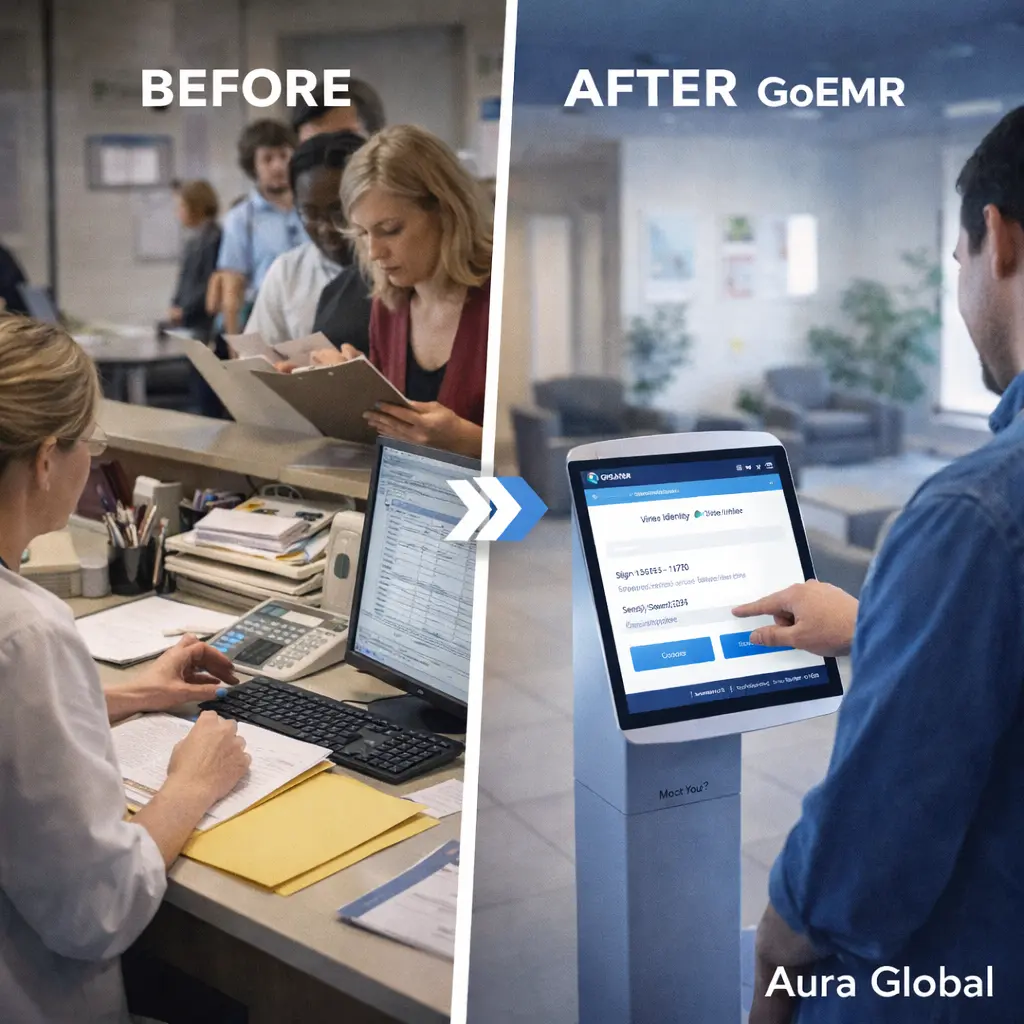
Your waiting room bottleneck starts at the front desk. Every patient who walks through the door triggers the same sequence: the receptionist looks up, hands over a clipboard with three pages of forms, asks for the insurance card, and starts typing. Meanwhile, two more patients arrive, the phone rings, and the line grows. The provider is ready in exam room two, but the patient is still at the counter spelling their address for the third time because the previous visit had a typo that nobody corrected.
This isn't a staffing problem. The front desk team isn't slow — they're overwhelmed. They're doing work that the patient could do faster, more accurately, and with less frustration. Verifying a home address. Confirming a phone number. Signing a consent form that hasn't changed since the last visit. Updating insurance information that the patient has on their phone. None of this requires a human intermediary. All of it creates a queue.
AuraEMR's Check-in Kiosk was built on a simple observation: the fastest way to eliminate a bottleneck is to let the people stuck in it solve it themselves. Patients verify their own demographics, sign their own consent forms, update their own insurance, and complete their own intake questionnaires — all on a tablet, before they sit down. Average check-in time drops from 12 minutes to under 3. The waiting room moves. The front desk breathes. And the practice runs the way it should.
The Front Desk Bottleneck
The front desk of a medical practice is the most overloaded workstation in the building. It handles check-in, check-out, scheduling, phone calls, referral coordination, prior authorizations, and every walk-in question a patient or vendor has. And every one of those tasks competes for the same limited resource: the attention of one or two people sitting behind a counter.
The check-in process alone consumes a disproportionate share of that attention. Here's what happens in a typical practice without self-service check-in:
- Patient arrival — The patient walks in, states their name, and waits while the receptionist pulls up their record. If there are two patients ahead of them, they stand in line. If there's a phone call in progress, they wait longer. The first impression of the practice is a queue.
- Paper forms — The receptionist hands the patient a clipboard with demographic verification forms, HIPAA acknowledgment, consent for treatment, and possibly a health history questionnaire. The patient sits down, fills it out by hand — often re-writing the same information they provided last visit — and returns the clipboard. Now someone has to read the handwriting and enter the data into the system.
- Insurance verification — The receptionist asks for the insurance card, makes a copy (or takes a photo), and manually enters or verifies the policy number, group number, and subscriber information. If the patient changed insurance since their last visit and forgot to mention it, this step catches it — but at the cost of several minutes and a potential delay if eligibility needs to be re-verified.
- Data entry errors — Manual transcription of handwritten forms introduces errors. A transposed digit in a date of birth. A misspelled street name. An insurance ID with an "O" that looks like a "0." These errors don't surface immediately — they surface weeks later when a claim is denied, and by then nobody remembers the original form.
- Time per patient — Industry studies consistently show that manual check-in takes between 8 and 15 minutes per patient. For a practice seeing 80 patients a day, that's 10 to 20 hours of staff time consumed by a process that adds no clinical value. It's pure overhead — necessary, but ripe for automation.
The front desk shouldn't be a data entry station. It should be a welcome center. The difference is what you automate.
Demographic Verification — By the Person Who Knows Best
Nobody knows a patient's current address, phone number, and emergency contact better than the patient. And yet, in traditional check-in workflows, we ask patients to write this information on paper, hand it to a staff member, and trust that it gets entered correctly into the system. It's a game of telephone with a pen and a clipboard, and the error rate is exactly what you'd expect.
AuraEMR's Check-in Kiosk puts demographic verification directly in the patient's hands:
- Pre-populated fields — When the patient identifies themselves at the kiosk — by name and date of birth, appointment lookup, or QR code from their confirmation message — the system displays their current demographic information on screen. Name, address, phone, email, emergency contact, employer, and preferred pharmacy. The patient reviews what's there and taps "Confirm" if everything is correct. No re-writing. No redundant forms.
- Inline editing — If something has changed — a new phone number, a new address, a different emergency contact — the patient taps the field and types the correction directly. The update flows into AuraEMR immediately. No handwriting interpretation. No transcription delay. No clipboard sitting in a pile waiting to be entered.
- Accuracy improvement — When patients verify their own data, the accuracy rate climbs dramatically. Studies on patient self-service registration consistently show error rates dropping by 50% to 70% compared to staff-mediated entry. The patient knows their zip code. The patient knows how to spell their street name. Letting them type it eliminates the intermediary error.
- Multi-language support — AuraEMR's kiosk interface supports multiple languages. A patient more comfortable reading Spanish, Hindi, or Mandarin can switch the interface with one tap. Demographic verification in the patient's preferred language reduces confusion and improves data quality — especially for fields like address formatting that vary by cultural convention.
- Audit trail — Every demographic change made through the kiosk is logged with a timestamp and the source (patient self-service). If a billing issue arises because an address was changed, there's a clear record of when it changed and who changed it. Accountability is built in.
Demographic data is the foundation of every claim, every correspondence, and every communication the practice sends. Getting it right at check-in prevents cascading errors downstream. And the most reliable way to get it right is to let the patient do it themselves.
Consent Forms and Intake Questionnaires — Digital, Done, Filed
Every practice has consent forms. HIPAA Notice of Privacy Practices. Consent for treatment. Financial responsibility agreements. Telehealth consent. Research study consent. Some practices hand patients five or six forms at every visit. The patient signs them without reading them — because they've signed the same forms before — and the paper goes into a scanner, gets filed as a PDF, and is never looked at again until a compliance audit.
Intake questionnaires are the same story. A PHQ-9 for depression screening. A pain assessment. A review of systems. A pre-visit health history update. All on paper. All requiring manual scoring or data entry after the patient hands them back.
AuraEMR digitizes both processes completely:
- Smart consent presentation — The kiosk knows which consent forms the patient has already signed and when. If the HIPAA acknowledgment was signed six months ago and hasn't changed, it doesn't get presented again. If a new telehealth consent form was added since the patient's last visit, only that form appears. Patients sign what's necessary — nothing more.
- Electronic signature capture — Patients sign on the tablet screen with their finger or a stylus. The signature is captured, timestamped, and linked to the specific version of the document that was presented. This creates a legally defensible consent record that's far more robust than a scribble on a paper form that may or may not have been the current version.
- Conditional intake questionnaires — AuraEMR presents intake questionnaires based on the visit type, the patient's conditions, and clinical protocols. A new patient gets the full health history. A follow-up for depression management gets the PHQ-9. A pre-surgical visit gets the anesthesia screening questionnaire. The kiosk is intelligent about what to ask and when.
- Automatic scoring — Standardized screening tools — PHQ-9, GAD-7, AUDIT-C, Edinburgh Postnatal Depression Scale — are scored automatically as the patient completes them. The score is immediately available in the chart before the provider enters the room. A PHQ-9 score of 19 shows up as a flag, not as a paper form waiting to be scored after the visit.
- Pre-visit completion — For practices that want to go further, AuraEMR can send intake questionnaires to patients before the visit through the patient portal or a secure link. Patients complete them at home, at their own pace, without the time pressure of the waiting room. By the time they arrive, the data is already in the chart. The kiosk check-in becomes even faster.
A consent form that's signed, scanned, and filed in a drawer is compliance theater. A consent form that's digitally signed, version-tracked, and instantly retrievable is actual compliance.
Insurance Capture and Real-Time Eligibility
Insurance verification is one of the most time-consuming and error-prone steps in the check-in process. The receptionist asks for the card, copies the information, and enters it into the system. If the patient has new insurance, the old policy has to be deactivated and the new one entered. If the patient has multiple coverages, the coordination of benefits has to be sorted out. And all of this happens while other patients are waiting.
The consequence of getting insurance wrong at check-in is a denied claim weeks later. The claim goes out to the wrong payer, or with the wrong policy number, or without recognizing that the patient's coverage terminated last month. By the time the denial comes back, fixing it requires re-verifying eligibility, re-submitting the claim, and hoping the timely filing deadline hasn't passed.
AuraEMR's kiosk handles insurance capture and verification in real time:
- Card image capture — The patient holds their insurance card up to the tablet's camera. AuraEMR's OCR (optical character recognition) reads the card and extracts the payer name, policy number, group number, and member ID. The patient confirms the extracted data on screen. No manual entry by staff. No photocopier. No handwriting.
- Change detection — If the insurance information on the card doesn't match what's on file, the kiosk flags the change and asks the patient to confirm. "Your insurance has changed since your last visit. Is this your current coverage?" A simple yes/no question that prevents claims from going to the wrong payer.
- Real-time eligibility verification — As soon as insurance is confirmed, AuraEMR runs an eligibility check against the payer in real time. Active coverage, copay amount, deductible status, remaining benefits, and authorization requirements are returned before the patient finishes checking in. If coverage has lapsed, the front desk is alerted immediately — not after the encounter when the claim bounces.
- Copay calculation and collection — With eligibility verified, AuraEMR knows the copay amount. The kiosk can display the copay and offer payment via integrated card reader or mobile payment. Point-of-service collection rates are highest when the amount is presented clearly and the payment method is convenient. Many practices see copay collection rates above 95% with kiosk-based collection, compared to 60–70% with traditional front-desk collection.
- Secondary insurance handling — For patients with multiple coverages, the kiosk walks through each one in sequence. Primary, secondary, and tertiary coverage are captured and ordered correctly. Coordination of benefits issues that would otherwise require a billing specialist to sort out are handled at the point of check-in.
Every claim starts with insurance data. When that data is captured accurately and verified in real time at the moment of check-in, the downstream billing process runs cleaner, faster, and with dramatically fewer denials.
Liberating the Front Desk
The check-in kiosk isn't about replacing front desk staff. It's about freeing them from routine data entry so they can do the work that actually requires a human being. The work that patients notice. The work that makes a practice feel welcoming instead of bureaucratic.
When 80% of patients check themselves in through the kiosk, the front desk staff's role transforms:
- Exception handling — Not every patient can or will use a kiosk. Elderly patients who aren't comfortable with tablets. Patients with disabilities that require assistance. First-time patients who need help navigating the process. New patients with complex insurance situations. The front desk handles these exceptions with full attention, instead of trying to help while simultaneously checking in three other patients.
- Patient experience — A receptionist who isn't buried in data entry can make eye contact, greet patients warmly, answer questions, and provide directions. They can notice that a patient looks confused or distressed and proactively offer help. The human element of the front desk isn't lost — it's amplified because the mechanical work is gone.
- Phone management — In most practices, the front desk answers the phone and checks in patients simultaneously — and does both poorly. With kiosk check-in reducing the in-person workload, staff can give proper attention to phone calls: scheduling, prescription refill requests, insurance questions, and referral follow-ups. Call hold times drop. Patient satisfaction scores climb.
- Proactive workflow support — Freed from the check-in assembly line, front desk staff can monitor the schedule, prepare for upcoming patients, coordinate with clinical staff on late arrivals or cancellations, and handle prior authorizations that would otherwise stack up. They shift from reactive (processing whoever walks up) to proactive (keeping the entire clinic flowing).
- Reduced burnout — Front desk positions have some of the highest turnover rates in healthcare. The work is repetitive, the pace is relentless, and the pressure comes from every direction — patients, providers, phone calls, and management. Automating the most repetitive part of the job doesn't just improve efficiency; it improves the quality of life for the people who do it every day. Staff who aren't burned out stay longer, perform better, and create a better experience for everyone.
The best use of a front desk team isn't data entry. It's hospitality, problem-solving, and keeping the practice running. Give them the tools to do that work, and everything gets better.
Less Waiting, More Caring
The patient experience doesn't start when the provider walks into the exam room. It starts the moment the patient walks through the front door. And for most patients, that first experience is waiting. Waiting in line to check in. Waiting to fill out forms. Waiting for their insurance to be verified. Waiting for the clipboard to be collected. Waiting to be called back. Every minute of waiting erodes trust, builds frustration, and sets a negative tone for the entire visit.
AuraEMR's Check-in Kiosk attacks waiting time at its root:
- 12 minutes to under 3 — The average manual check-in takes 8 to 15 minutes per patient when you count the line wait, the form completion, and the data entry. Kiosk check-in reduces this to under 3 minutes. The patient walks in, taps the screen, confirms their information, signs what needs signing, and sits down. By the time they've checked their phone, they're being called back.
- No lines — Multiple kiosks can operate simultaneously. Two patients can check in at the same time without waiting for a single receptionist to finish with the person ahead of them. During peak arrival times — the morning rush, the post-lunch wave — throughput increases without adding staff.
- Pre-arrival check-in — For practices that enable it, AuraEMR sends a check-in link to patients before their appointment. They complete demographics, consent, and questionnaires from their phone at home. When they arrive, the kiosk recognizes them and confirms: "Welcome back. Everything's up to date. Please have a seat." Total in-office check-in time: under 30 seconds.
- Real-time arrival notification — The moment a patient completes kiosk check-in, the clinical team is notified. The medical assistant sees the patient's name move to "arrived" on their workflow screen. Rooming can begin immediately — no waiting for the front desk to finish entering data and manually flag the patient as ready.
- Measurable impact — Practices that implement self-service check-in consistently report 30% to 50% reductions in average wait time, 20% to 40% increases in patient satisfaction scores, and significant improvements in on-time appointment starts. The math is straightforward: less time checking in means less time waiting, which means more time for care.
Patients don't choose a healthcare provider because of the check-in experience. But they remember a bad one. And they talk about it. Every minute shaved from the waiting room is a minute returned to the patient — and to the practice's reputation.
Less waiting. More caring. That's the AuraEMR difference.
12 minutes to under 3. No lines. No clipboards.
AuraEMR's Check-in Kiosk lets patients verify demographics, sign consent forms, update insurance, and complete intake questionnaires — all on a tablet, before they sit down. Less waiting. More caring.